
PopPop AI Vocal Remover Official Guide
Learn how to remove vocals online with PopPop AI Vocal Remover. Separate a song or video into original, vocal, and instrumental MP3 tracks, then download one track or all of them.
Overview
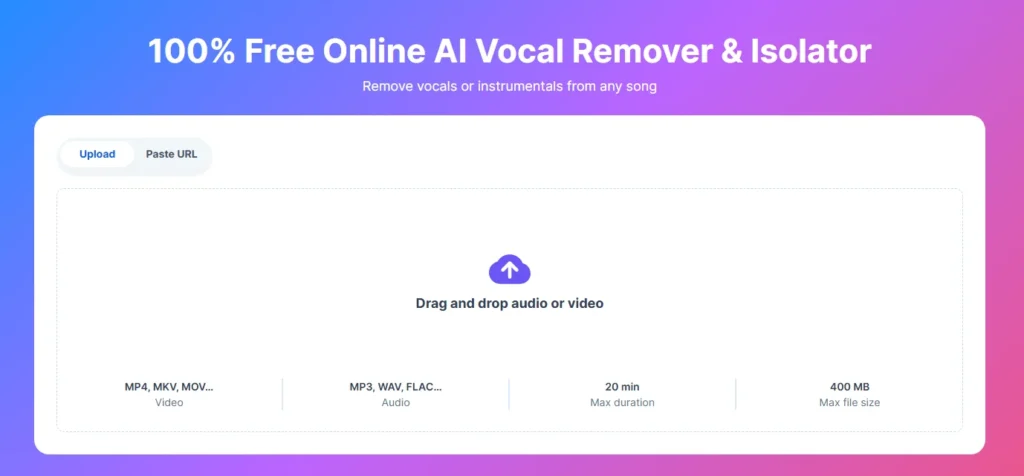
PopPop AI Vocal Remover is a free online tool that separates a song into vocals and background music. You use it in a browser. There is nothing to install, and you do not need an account.
Open the tool here: PopPop AI Vocal Remover. It works in Chrome, Firefox, Safari, and Edge, on Windows, macOS, Android, and iOS.
You can upload an audio or video file, or paste a link to an online audio or video. Each run produces three tracks. The free tool allows 20 conversions a day. A file can be up to 20 minutes long and 400 MB.
What You Get After Separation
When processing finishes, PopPop AI Vocal Remover shows three tracks:
- Original: the audio from the file or link you submitted, unchanged
- Vocal: the isolated singing or speaking voice
- Instrumental: the background track with the vocals removed
You can preview each track, download only the one you need, or download all of them at once. Saved vocal and instrumental files are MP3. The result is audio, not a new video with the sound removed.
Use the instrumental track as a karaoke version. Use the vocal track when you only want the voice. You do not have to run the tool twice to get both.
Supported Files and Links
Audio uploads can be MP3, WAV, or FLAC. Video uploads can be MP4, MKV, or MOV. If you already have a video, you can upload it directly. The tool uses the soundtrack and still returns audio tracks.
You can also paste an audio or video URL instead of uploading. If the link cannot be processed, download the file to your device and upload it.
How to Remove Vocals from a Song
- Open PopPop AI Vocal Remover.
- Upload an audio or video file, or paste the audio or video URL.
- Start the separation and wait for it to finish.
- Play the Original, Vocal, and Instrumental tracks.
- Download the track you want, or download all three at once.

Each song you process counts as one conversion. The daily limit is 20 conversions. A longer or larger file must be shortened or compressed first if it exceeds 20 minutes or 400 MB.
How to Keep Only the Vocals or Only the Instrumental
You do not choose the output before processing. The tool always prepares all three tracks.
- To remove the vocals, download Instrumental.
- To keep only the voice, download Vocal.
- To keep a copy of the source audio, download Original.
Preview the tracks before you download. Separation quality depends on the recording. A dense mix, heavy effects, or a voice that sits inside the music may leave some bleed between the vocal and instrumental tracks.
Limits
| Item | Free tool |
|---|---|
| Conversions | 20 a day |
| Length | Up to 20 minutes |
| File size | Up to 400 MB |
| Upload formats | MP3, WAV, FLAC, MP4, MKV, MOV |
| Output | MP3 for the vocal and instrumental tracks |
| Account | Not required |
If you reach 20 conversions, wait until the next day before starting another song.
What This Tool Does Not Do
- It does not return a muted video. Video files are accepted as input, but the download is audio.
- It does not split drums, bass, guitar, or other instruments into separate stems. You get vocals and one instrumental track.
- It does not remove noise, reverb, or backing vocals with a separate control.
- It does not process files longer than 20 minutes or larger than 400 MB.
- It does not run offline.
Tips
- A studio mix usually separates more cleanly than a live recording or a phone video.
- If a link fails, upload the file instead.
- Download all three tracks when you might need both the vocal and the instrumental later. You do not have to spend another conversion.
- For help, email support@poppop.ai.
FAQ
Yes. You can use it in a browser without an account. The free tool allows 20 conversions a day.
Yes. Open the page in Chrome, Firefox, Safari, or Edge on Android or iOS.
MP3, WAV, FLAC, MP4, MKV, and MOV, up to 20 minutes and 400 MB.
Original is the unchanged audio. Vocal is the isolated voice. Instrumental is the background music without the vocals.
Yes. Download any one track, or download all of them at once.
The limit is 20 conversions a day. Wait until the next day, or check that the file is under 20 minutes and 400 MB.