
PopPop AI Voice Cloning Official Guide
Learn how to clone your voice with PopPop AI. Record a sample in AI Audio Tools, then use the AI voice for text to speech or an AI song cover.
Overview
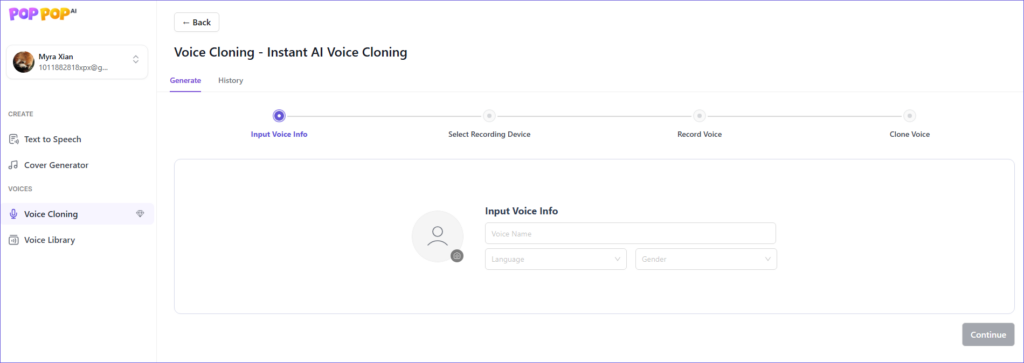
PopPop AI Voice Cloning records a sample of your voice and creates an AI voice from it. The AI voice can then read text or sing a cover. This is the online cloner inside PopPop AI Audio Tools, not the voice tools in the TTSFree AI desktop app.
Open the product page here: PopPop AI Voice Cloning. Cloning itself runs in the PopPop AI web app.
Voice cloning is not part of the free tools that work without an account. The Basic plan includes 2 voice clones a month.
Before You Record
Clone a voice only when you have the right to use it. That means your own voice, or a voice whose owner has given you permission.
Do not use a cloned voice to impersonate someone, mislead listeners, or commit fraud. A cloned voice is not automatically cleared for ads, YouTube, or resale. Follow the PopPop AI terms, and get any other permission the recording requires.
Record in a quiet room. Use the best microphone you have. Background noise, music, and other people talking will end up in the clone. You record inside the tool, in one of the 18 supported languages.
How to Clone Your Voice
- Visit the PopPop AI web app, sign in, and switch to the Voice Cloning tab.
- Enter the voice info, including the name, language, and gender. Then click Continue.
- Select the correct recording device, such as your microphone.
- Click Start Recording, read the text in the box, then click Stop Recording.
- Click Clone Your Voice to start cloning.
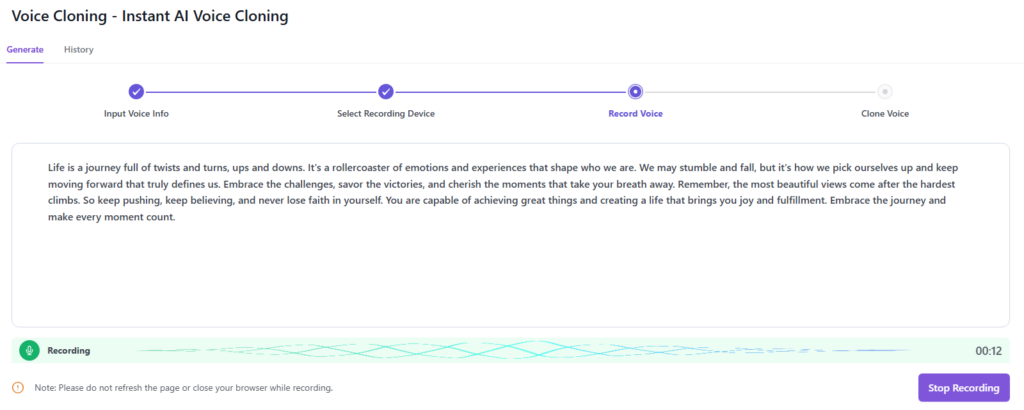
Wait for the clone to finish, then preview the AI voice before you use it. Each finished clone counts toward the monthly limit. On the Basic plan, that limit is 2 clones a month. Unused clones do not roll over.
Use the Cloned Voice
After the clone is ready, use it in the other AI Audio Tools on your account:
- Text to Speech: paste text and generate speech in your cloned voice.
- AI Song Cover: apply your cloned voice to a song and download the cover.
The public text-to-speech page, which allows 15 free conversions a day, is a separate tool. It uses the built-in voice library, not this cloned voice. Covers you make with a pre-built celebrity or character voice are also separate. Those do not require a clone.
Limits
| Item | Detail |
|---|---|
| Where it runs | PopPop AI web app, Voice Cloning tab |
| Who can use it | A signed-in plan that includes voice cloning |
| Basic plan | 2 clones a month |
| Sample | A recording you make in the tool |
| Voice info | Name, language, and gender |
| Languages for the recording | 18 supported languages |
| What you can do with it | Text to speech and AI song covers in AI Audio Tools |
What This Tool Does Not Do
- It does not clone a voice from the free, no-login text-to-speech page.
- It does not replace the TTSFree AI desktop app.
- It does not make a cover by itself. You use the finished clone in the AI Song Cover tool.
- It does not give you the right to imitate someone who has not agreed.
Tips
- Choose the right microphone in the device list before you click Start Recording. The wrong input will record silence or another sound.
- Read the text in the box at the same volume and pace you want in the final voice.
- If you stumble, click Stop Recording and record that sample again before you click Clone Your Voice.
- If the clone misses a name or sounds uneven, record a cleaner sample and create another clone, if you still have one left this month.
- Make the text-to-speech test short before you convert a long script.
- For help, email support@poppop.ai.
FAQ
No. The free tools that work without an account do not include voice cloning. The Basic plan includes 2 clones a month.
Sign in to the PopPop AI web app and open the Voice Cloning tab. Enter the name, language, and gender, record the text in the box, then click Clone Your Voice.
The recording step asks you to read the text shown on screen. That text is randomly generated, and the reading has to be accurate enough for the clone to be accepted. Because of that, another person has to record the sample themselves. You need their permission, and they need to read the text for you. Do not use a cloned voice to mislead people or to commit fraud.
Yes. Use it in the AI Song Cover tool inside AI Audio Tools.
Yes. Select the cloned voice in the Text to Speech tool inside AI Audio Tools.